
Security professionals running multi-site operations lose sleep over vendor delays, outdated drawings, and shrinking budgets. These challenges are real, but most of them trace back to inconsistency. This is one part of security system design software — our full guide covers how the stages fit together.
Different sites. Different vendors. Different ideas of what passes for “secure.”
Industry data shows the cost clearly. Poor project management and a lack of standardization drain U.S. companies of $50 to $150 billion a year.
Security teams lose hours every week chasing specs, fixing preventable mistakes, and duplicating work that was already solved elsewhere. These losses show up in coverage gaps, failed upgrades, and budgets that bleed before a project even gets off the ground.
Here’s a four-step blueprint security professionals are using to break the cycle and build physical security design standards that scale with consistency, control, and minimal chaos. All of it depends on security system design process.
Step 1: Define the standard before the project starts
Consistency begins with clarity. Security teams working at scale know that improvising the design process on a per-site basis leads to chaos. Ask any security professional at your next GSX conference, and they’ll agree.
The challenge is that most teams are moving fast, juggling legacy infrastructure, vendor turnover, and internal pressure to “just get it done.” So, standards get skipped. Design decisions happen on the fly. And what works at one site turns into a mystery at the next.
This is how inconsistency in physical security design plays out and what changes when teams build from a standard:
| Focus | Without a Standardized Design Process | Standardized Physical Security Design |
|---|---|---|
| Hardware & Tech | X-Device types and placements vary by site. | Consistent camera, access control, and hardware specs across all sites. |
| Documentation | X-Floorplans and install details scattered across vendors. | Centralized, organization-approved design templates and documentation. |
| Speed to Market | X-Field teams forced to make design calls on-site. | Predefined layouts reduce guesswork and speed up deployment. |
| Lifecycle & Audit | X-No baseline for audits, upgrades, or troubleshooting. | Reliable as-builts and device histories stored and accessible |
To kick off your standardization mission:
- Build a master design standard that outlines approved devices, placement rules, naming conventions, and documentation formats.
- Distribute it to internal teams and integrators before any design work begins.
- Require vendors to follow the baseline and document how exceptions are reviewed and approved.
When every team, from integrators to regional facility leads, is working from the same standard, decisions move faster, documentation gets tighter, and costly deviations stop before they start.
Step 2: Design better with repeatable templates
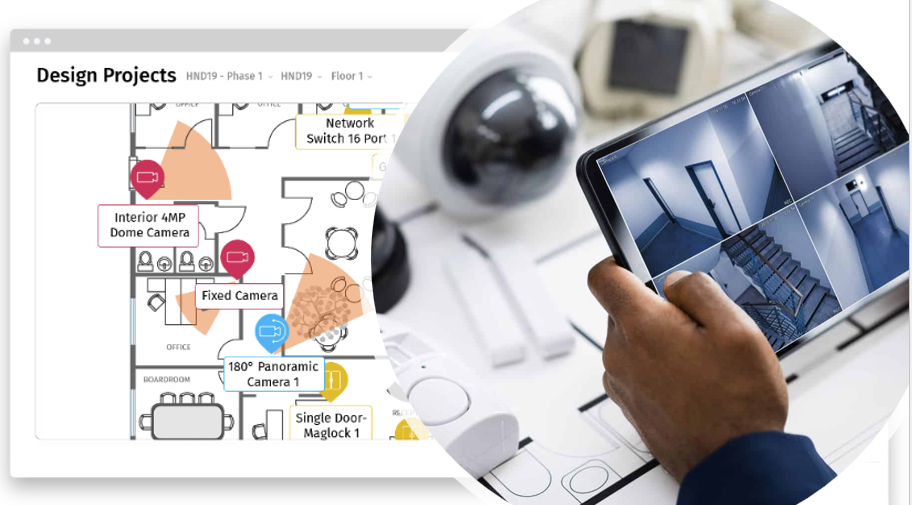
Standardization only works if it’s repeatable. When each new site starts from a blank slate, designs drift, devices vary, and teams waste time solving problems that were already figured out at the last location.
Templates fix that.
| With Repeatable Templates designed for Physical Security | ||
|---|---|---|
|
 |
|
To build repeatable templates:
- Identify the most common site types in your portfolio (e.g., clinics, offices, distribution centers)
- Use a centralized platform to create baseline floorplans with pre-approved devices, placement logic, and naming conventions
Templates eliminate guesswork, reduce design drift, and ensure your physical security standards hold up across every location, every time.
Step 3: Align every team around a shared design source
Misalignment is a silent budget killer. IT has one plan. Facilities has another. The integrator is working from an outdated PDF. Field teams are texting photos. And everyone’s making “just one small change” that never makes it into the final design.
This is how decisions fall through the cracks and how avoidable issues become costly rework.
| Breakdown Point | What It Looks Like | Cost to the Project |
|---|---|---|
|
|
|
When every stakeholder works from the same live design file, communication stays tight, errors stay low, and approvals move fast. This level of clarity sets the standard for scalable physical security infrastructure.
Step 4: Physical security designed for field accuracy
A design that checks the boxes on paper doesn’t mean much if it fails in the field. That disconnect is where coverage gaps, installation delays, and failed inspections come from.
Most of the time, it’s not the design team’s fault. They’re working off incomplete drawings, unverified assumptions, or outdated building details. Field teams get handed a plan that doesn’t reflect what’s actually there.
Field accuracy closes that gap.
To design for field accuracy:
- Start every project with updated, scaled floorplans that reflect real-world conditions.
- Use visual planning tools to confirm device coverage and eliminate blind spots.
- Document device placements with mounting instructions, cable paths, and field notes.
- Make field access to the live design standard.
Field-ready security design at scale
Outlining a blueprint is one thing. Executing it across dozens of live locations is where most security programs break down.
SiteOwl makes it easier by centralizing designs, tightening collaboration, and giving field teams the clarity they need to execute without second-guessing. That is what standardize security systems is for.
Here’s how a leading financial institution used this approach to upgrade physical security across more than 70 branches, eliminating the guesswork that used to slow everything down.
| Before a field-ready design approach | Field-ready, standardized design process |
|---|---|
| Security upgrades dragged teams relied on disconnected systems and outdated floorplans. | Real-time project tracking kept every branch on schedule. |
| Field teams worked with limited visibility. | Digital workflows made vendors accountable and visible at every step. |
| Techs visited sites just to verify details. | Remote visibility cut unnecessary site visits by 50% |
| Admins spent hours updating spreadsheets. | Automated tracking saved 400+ admin hours a year. |
| Last-minute changes blew up timelines and budgets. | Fewer surprises in the field, 78% drop in change orders and 10–15% cost savings, |
Design physical security standards that scale
Security professionals lose sleep over what they can’t see. When designs drift from site to site, inconsistency becomes a hidden tax eroding time, clarity, and control at every stage of the security lifecycle.
That’s why experienced security and facilities teams are moving away from reactive installs and toward proactive design. With clear standards, repeatable templates, shared sources of truth, and field‑ready plans, they’re building physical security systems that scale without the usual chaos.
SiteOwl brings that approach together in one platform purpose‑built to manage physical security from design through deployment and beyond, and that starts with security design spreadsheets.
Experience a better way to design.
Schedule your SiteOwl demo and see how consistent, scalable security starts at the design stage.